


Oscars 2026 VFX Race
The 98th Academy Awards Best Visual Effects category is one of the most competitive technical races this year.
Major contenders
- Avatar: Fire and Ash
- F1
- Sinners
- The lost bus
- Jurassic world rebirth

Industry predictions strongly favor Avatar: Fire and Ash due to its groundbreaking underwater and large-scale simulation work.
Meanwhile Sinners received heavy attention because of complex digital characters and environmental effects such as digital cotton fields and vampire transformations.
Corridor Crew’s Key AI Model in Under 6GB VRAM
AI keying tools like CorridorKey are getting a lot of attention lately, especially because they promise something every compositor wants, perfect green screen extraction with physically accurate color unmixing.
The idea is impressive on paper. You feed in a raw green screen frame, and the neural network separates the foreground from the green background while reconstructing the true straight color of the subject. Even tricky areas like motion blur, fine hair, and defocused edges are supposed to come out clean with a proper linear alpha.
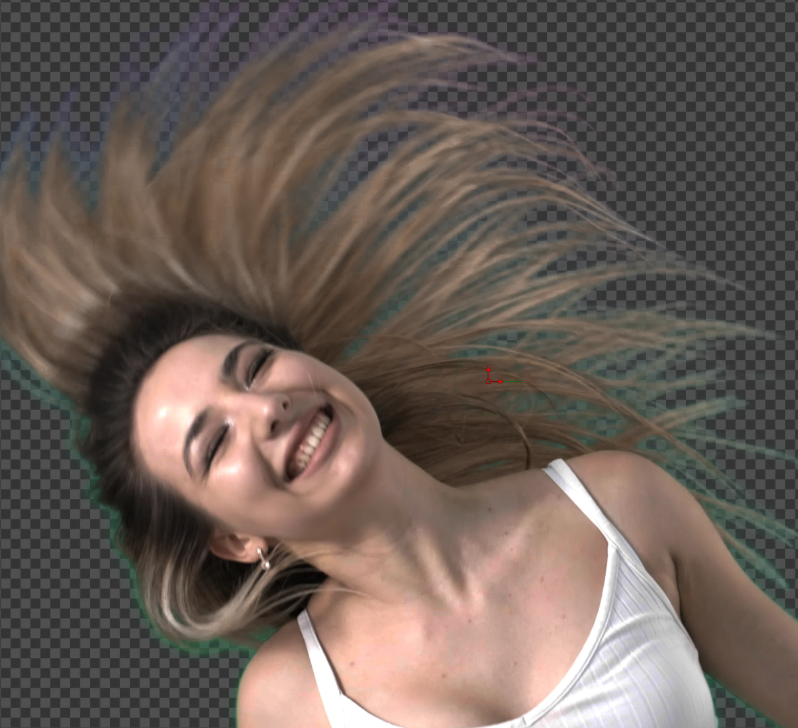
Technically, the system is doing more than a typical chroma key. It predicts both the unmixed foreground color and the alpha per pixel, which is similar to what compositors try to reconstruct manually when dealing with heavy green spill or semi transparent elements.
But from a compositor’s perspective, tools like this still don’t solve every situation.
Green screen work is rarely clean in production. You often deal with uneven lighting, color contamination, compression artifacts, lens blur, edge reflections, and overlapping elements. In those cases, fully automated approaches can struggle or produce results that still need manual cleanup.
CorridorKey also relies on a coarse alpha hint, meaning you still need to generate an initial mask or rough key before running the model. At that point, a compositor is already doing part of the traditional workflow.
Another practical limitation is hardware. The system was originally built on a workstation with an RTX Pro 6000 and 96GB of VRAM, and even though the community is optimizing it for smaller GPUs, some of the advanced features still require extremely large amounts of memory.
From a pipeline perspective, the interesting part is that it outputs 16-bit or 32-bit linear EXR, which means it can integrate directly into tools like Nuke, Fusion, or Resolve without breaking color math.
So overall, CorridorKey is an exciting direction for AI-assisted compositing. But like many AI tools right now, it feels more like an additional tool in the compositor’s toolkit, rather than a replacement for traditional keying workflows.
In real production shots, there will still be plenty of situations where manual work, multiple keys, and custom edge treatments are unavoidable.
NNFlowVector v3.0
NNFlowVector just released version 3.0, and one of the biggest additions is the new AAA model. This model generates much cleaner optical flow vectors, with smoother motion and significantly less noise, even when working with larger resolution inputs.
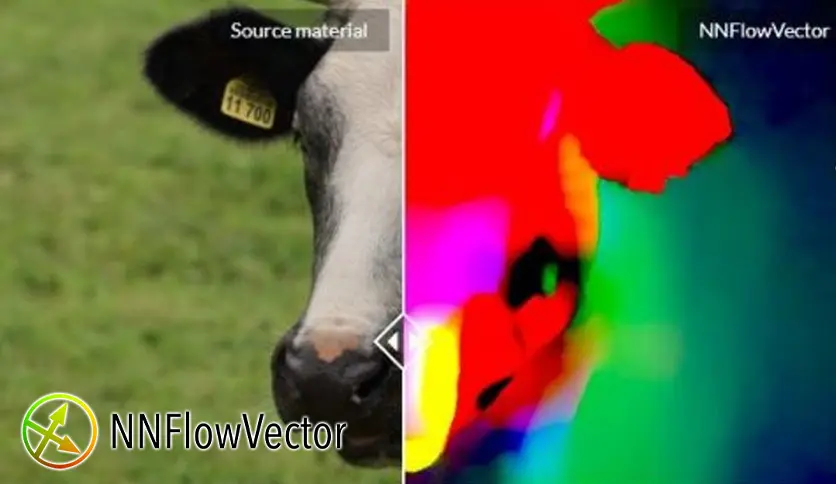
They also introduced a new node called NNFlowVectorWarp. It’s essentially a modern alternative to NukeX’s VectorDistort, but optimized specifically for NNFlowVector data. This means you can track patches, stabilize footage, and even generate STMaps for more efficient pre-rendered pipelines. In multi-GPU setups, the plugin automatically respects the –gpu parameter
Another important update is full compatibility with the latest Nuke versions, including Nuke 16.1 and Nuke 17. The plugin now works across Linux, Windows, and macOS.
ComfyUI app mode
One of the biggest updates in the AI VFX community.
The team behind ComfyUI has announced a major update that aims to make its powerful node-based workflows easier to share and use. The update introduces App Mode, App Builder, shareable app links, and a new community platform called ComfyHub.
Once configured, the new system allows creators to share their apps through a single URL. Anyone with the link can open the interface in a browser and run the workflow without needing to interact with the underlying node graph.
App Mode Simplifies Complex Workflows
ComfyUI is widely known as a node-graph workflow tool that gives users complete control over AI generation pipelines. Artists can connect nodes, adjust parameters, and build complex systems for tasks such as image generation, video processing, and automation.
With the new App Mode, those complex node graphs can now be transformed into a simplified interface.
Instead of a complex node graph, users can:
- type prompt
- adjust simple parameters
- click generate
This makes ComfyUI usable for non-technical artists. You can still switch to Node Mode if you want full workflow control.
Why this matters?
This is basically Stable Diffusion for normal artists.
Before
Node graph only → technical users
Now
App UI → general creators
NVIDIA and ComfyUI : GDC 2026
At Game Developers Conference 2026, NVIDIA announced new integrations with ComfyUI.
Major updates
- RTX Video Super Resolution node
- NVFP4 model optimization
- 2.5× faster AI generation
- 60% less VRAM usage
- 4K video upscaling workflows
The updates focus on local AI video generation on RTX GPUs pushes local AI video pipelines closer to real VFX workflows.
FMX 2026
FMX 2026 has announced its upcoming conference program.
FMX is one of the largest global conferences for VFX, animation, and digital media.
Key topics expected
- AI filmmaking
- virtual production
- real-time rendering
- generative media
- VFX pipelines

The event usually features presentations from studios like:
- ILM
- Weta FX
- Framestore
- Pixar