



Fluid Morph Using ComfyUI – A Smarter Way to Fix Bad Takes
Ever had a director ask to remove a performance from a shot after the footage is locked? Yeah, it’s one of those classic post-production headaches. In this tutorial, the presenter walks us through how to fix that kind of problem using both traditional tools like Nuke and a newer, AI-powered trick with ComfyUI.
The Problem: An Awkward Ollie
The scene is simple: a person in a warehouse does an ollie (a jump, like in skateboarding), but it looks awkward. The director doesn’t like it and wants the action removed. Here’s the catch the shot length has to stay the same (151 frames), so we can’t just cut it out.
First Try: Traditional Fluid Morph in Nuke
The presenter starts with the usual method: a Morph dissolve node in Nuke. It works by morphing the first and last frames around the unwanted section using motion vectors to fill in the middle. But this only works well for short gaps. In this case, the awkward move spans 92 frames—way too long. The results look weird and glitchy.
Smarter Fix: ComfyUI and AI Magic
That’s where ComfyUI comes in with the help from Benji AI FLF2V workflow, we load our first and last frames into the FLF2V (First–Last Frame to Video) model — generating a perfectly smooth morph sequence.
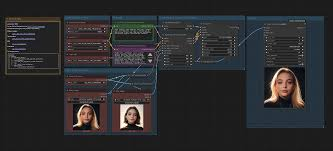
The workflow involves encoding the start and end frames into a “latent space” (think of it like a visual imagination zone), then letting the AI create everything in between. The results are surprisingly smooth and natural-looking.
With just two frames and the power of Comfy, FLF2V fills in the gaps with photorealistic keyframes that traditional morphs can’t touch.
Behind the Scenes: Setting Up ComfyUI
The tutorial dives into how to set this up in Comfy:
- Tweak sampling steps and CFG scale to get clean results
- Adjust image resolution to manage your VRAM
- Use GPU management nodes to keep your system stable
- Batch render the frames overnight if your machine is slow
Once you’ve generated your AI frames, you bring them back into Nuke. You use time offsets and frame switches to stitch everything back into place. No need for heavy cleanup, painting, or tracking.
some caveats though:
- Half float EXR wont work in Comfy ui you have to convert it to Jpeg
- Highlights will be clamped, footage will be blocky and there will be visible jump between exr and comfy generated output
- 4K render wont work in Comfyui, you have to down res it to work
In short: if you ever need to remove or replace a long section of footage without breaking the flow, Fluid Morph using ComfyUI might just be your new best friend.
https://www.patreon.com/posts/fluidmorphs-in-131624481