


ComfyUI, the popular open-source automation tool for creatives, just got a massive upgrade. In a major announcement today, the team introduced ComfyUI Native API Nodes, a powerful new feature that allows users to seamlessly connect with top-tier paid model APIs without ever leaving the ComfyUI environment.
These API Nodes bring integrated support for advanced models like Google Veo2, Flux Ultra, Stability AI’s Stable Image Ultra, Pika 2.2, OpenAI’s GPT-4o (Image), and many more. With this release, users now have access to 62 new nodes covering 10 major model families, all available natively in Comfy.
What Are API Nodes?
API Nodes are integrated modules inside ComfyUI that let users call external, often paid, generative models like text-to-video or image-to-image models directly from their local Comfy workflows. It’s a major leap for users who want to enhance their creativity with the best tools available, even when those tools aren’t local.
“ComfyUI is more than just a node system—it’s a creative automation engine,” the team said in their official announcement. “And creatives care about results. That means giving them access to the most powerful models, local or not.”
Expanded Model Support
Following the success of last week’s integration of GPT-Image-1, user feedback was immediate and loud: we want more models. The team delivered—bringing in support for major names across the AI creative space. The newly supported models include:
- Black Forest Labs: Flux 1.1[pro] Ultra, Flux .1[pro]
- Kling: Versions 2.0, 1.6, 1.5 + special effects
- Luma AI: Photon, Ray2, Ray1.6
- MiniMax: Text-to-Video, Image-to-Video
- PixVerse: V4 + effects
- Recraft: V3, V2, with multiple tools
- Stability AI: Stable Image Ultra, Stable Diffusion 3.5 Large
- Google Veo2
- Ideogram: V3, V2, V1
- OpenAI: GPT-4o Image
- Pika: Version 2.2
Pricing remains consistent with each API’s original rate, and users are encouraged to visit the documentation or contact support for details.
Free and Open-Source Always
Despite this leap into paid model integration, the ComfyUI team reassured its community that these new nodes are completely optional. The platform itself will continue to be free and open-source, allowing users to decide whether they want to integrate paid tools into their creative pipeline.
A Fresh Look for a New Era
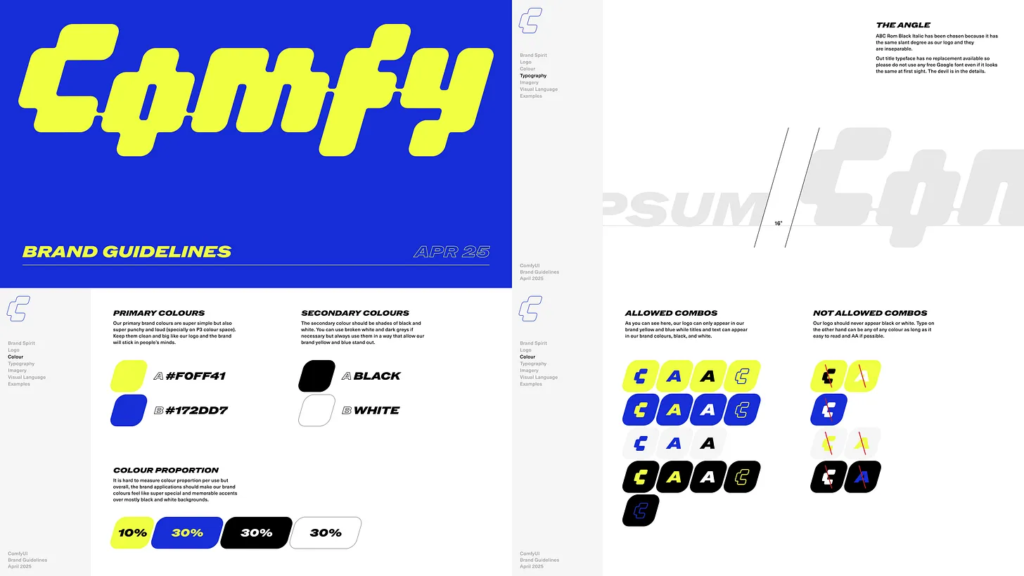
Alongside the release, ComfyUI is also rolling out a complete rebrand—including a new logo and color scheme. The visual refresh reflects the platform’s evolving mission: combining automation, accessibility, and cutting-edge AI into a tool that empowers creators at every level.
For more information on supported nodes, setup guides, or to report issues, users can visit the official documentation or reach out via email at [email protected].